1. Problem Statement
The core challenge: Claude Code is powerful but monolithic. To build production-grade AI systems, you need:
- Lifecycle hooks to inject behavior at key moments (session start, before/after tool use, on context compression)
- Reusable skills that agents can invoke with reference data (not just instructions)
- Specialized agents with defined capabilities, model selection, and routing logic
- User commands for workflow orchestration beyond chat
- MCP server integration to connect external data sources and APIs
- Settings management for user-specific configuration without hardcoding
The plugin ecosystem solves this by providing a declarative framework where plugins are composition layers — no build system, no compilation, just markdown, YAML, JSON, and executable hooks.
2. Architecture Overview
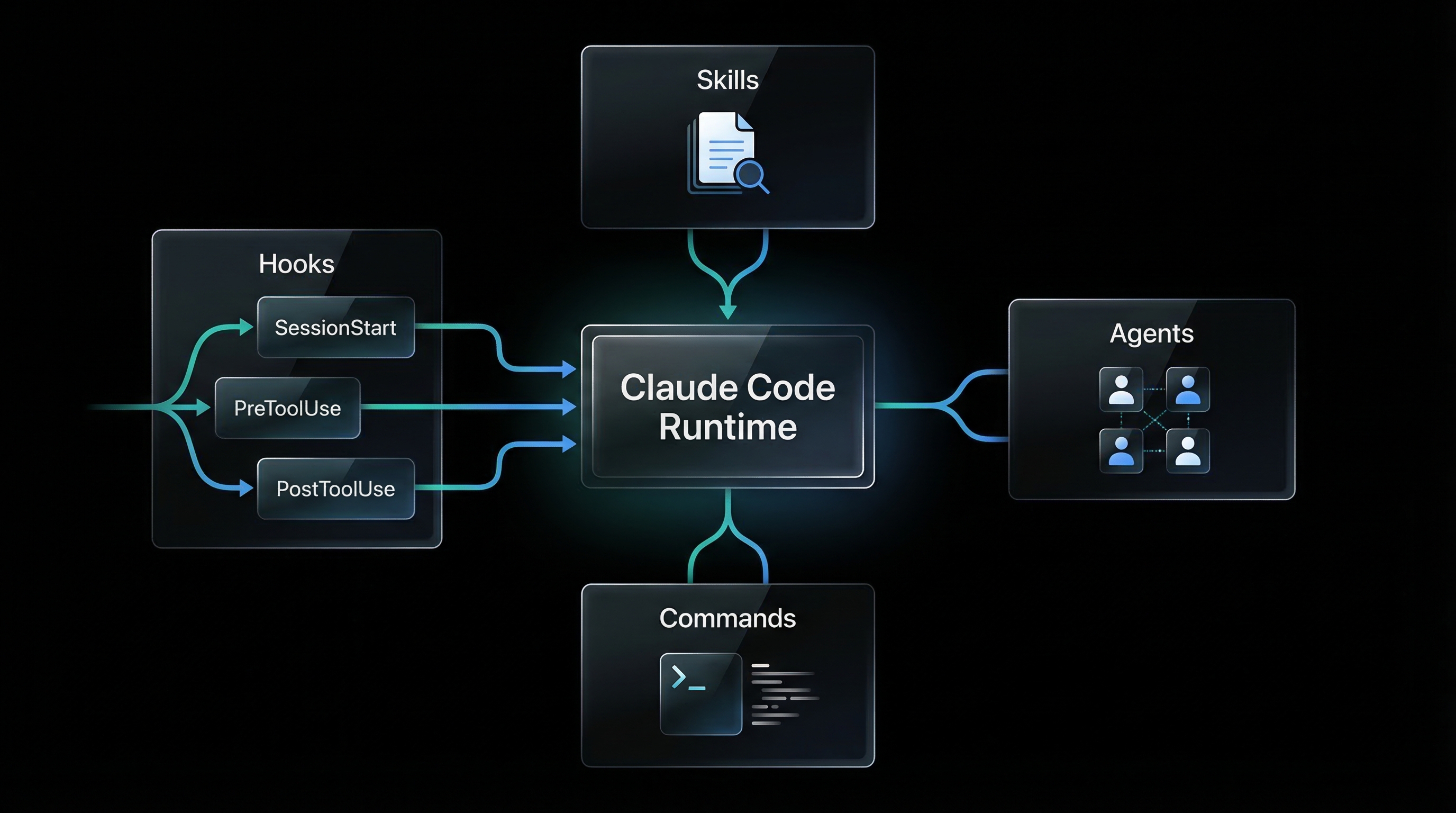
3. Key Components
3.1 Plugin Manifest (plugin.json)
The plugin.json file is the root manifest. It declares the plugin's identity and points to optional hooks.
{
  "name": "conductor",
  "description": "Multi-agent workflow orchestrator",
  "version": "1.0.0",
  "author": { "name": "AdvanceCyber" },
  "homepage": "https://github.com/example/plugin",
  "license": "MIT",
  "hooks": "./hooks/hooks.json",
  "configuration": {
    "api_url": "http://localhost:8080",
    "max_retries": 3,
    "enabled_features": ["tier_classification", "state_persistence"]
  }
}
Why this matters: Configuration lives in the manifest (defaults) and can be overridden in my-plugin.local.md for user-specific settings. No hardcoded API keys.
3.2 Hook System
Hooks are lifecycle event handlers. They run at specific moments in the agent's execution:
| Event | When It Fires | Use Cases |
|---|---|---|
SessionStart |
New session begins | Auto-recall memory, load state, inject context |
UserPromptSubmit |
User submits a message | Capture prompt, classify intent, trigger pre-processing |
PreToolUse |
Before tool execution | Approval gates, validation, policy checks |
PostToolUse |
After tool execution | Validate output, auto-link memory, log events |
Stop |
Agent response complete | Capture response, conversation history |
PreCompact |
Before context compression | Save session state, extract key context |
SubagentStop |
Subagent task completes | Aggregate results, update parent state |
Notification |
External event arrives | Webhook triggers, background jobs |
3.3 Hook Registry (hooks/hooks.json)
The hooks.json file maps events to executable commands. Each hook can have a matcher to filter when it runs.
{
  "description": "Memory plugin lifecycle hooks",
  "hooks": {
    "SessionStart": [
      {
        "hooks": [
          {
            "type": "command",
            "command": "python3 ${CLAUDE_PLUGIN_ROOT}/hooks/session_start.py",
            "timeout": 15
          }
        ]
      }
    ],
    "PreToolUse": [
      {
        "matcher": {
          "tool_name": "mcp__claude-memory__memory_store"
        },
        "hooks": [
          {
            "type": "command",
            "command": "python3 ${CLAUDE_PLUGIN_ROOT}/hooks/pre_store.py",
            "timeout": 10
          }
        ]
      }
    ],
    "PostToolUse": [
      {
        "matcher": {
          "tool_name": "Write|Edit"
        },
        "hooks": [
          {
            "type": "command",
            "command": "bash ${CLAUDE_PLUGIN_ROOT}/hooks/scripts/post-state-write.sh",
            "timeout": 10
          }
        ]
      }
    ]
  }
}
Matchers use regex patterns. tool_name: "Write|Edit" fires for Write OR Edit tools. Omit matcher to run on every event.
Environment variables: ${CLAUDE_PLUGIN_ROOT} resolves to the plugin directory at runtime.
3.4 Hook Execution Contract
Hooks receive event data via stdin (JSON) and return decisions via stdout (JSON).
Input (stdin):
{
  "tool_name": "Write",
  "tool_input": {
    "file_path": "/path/to/file.txt",
    "content": "..."
  },
  "session_id": "abc123",
  "timestamp": "2026-03-17T12:00:00Z"
}
Output (stdout):
{
  "decision": "allow",         // allow | block | inject
  "message": "Validation passed",
  "inject_content": "",         // Optional: inject into system message
  "metadata": {}                // Optional: additional data
}"allow"— proceed with tool execution"block"— stop execution, show error to user"inject"— add content to system message (SessionStart, PreToolUse)
Fail-open principle: If a hook script fails (non-zero exit, timeout), the system continues. Hook errors are logged but don't crash the agent.
3.5 Skills Framework
Skills are reusable knowledge modules that agents invoke. Each skill has:
- SKILL.md — Entry point with YAML frontmatter (name, description) and agent instructions
- references/ — Directory with YAML/markdown reference files (data, examples, decision trees)
Example: conductor-workflow-reference skill
---
name: conductor-workflow-reference
description: |
  Tier-specific workflow templates, phase sequences, and verification gate definitions.
  Use when determining phase sequences for a tier or checking gate modes.
---

# Conductor Workflow Reference

## TRIVIAL tier (score 1.0-1.5)
analyze-codebase → conductor-builder(plan-and-implement) → verify

## MINOR tier (score 1.6-2.3)
analyze-codebase → conductor-builder(plan) → conductor-builder(implement)
→ conductor-ciso(advisory) → conductor-critic(advisory) → verify

For detailed phase descriptions, see `references/phase-workflows.md`.
For verification gate details, see `references/verification-gates.md`.
Why skills matter: Instead of embedding a 200-line workflow table in an agent prompt, the agent loads the skill on-demand. This keeps agent prompts focused and context-efficient.
3.6 Agent Definitions
Each agent is a markdown file in agents/ with YAML frontmatter and a system prompt.
Example: conductor-builder.md
---
name: conductor-builder
description: |
  Implements code from TODO specs. Three modes: plan-only, implement-only,
  plan-and-implement. Updates BRD-tracker.json status after completion.
model: opus[1m]
---

# Builder Agent — Code Implementation Specialist

You are the Builder Agent. You implement production-ready code from TODO specs.

**Your operating modes:**

1. **plan-only**: Break down complex specs into step-by-step implementation plans
2. **implement-only**: Execute a pre-approved plan
3. **plan-and-implement**: Do both (for TRIVIAL/MINOR tier only)

**Critical rules:**
- NO placeholders, stubs, or TODO comments
- Every integration must actually connect (not mocked)
- Update BRD-tracker.json after every TODO file completion
- Move spec from TODO/ to COMPLETE/ when done

**When you receive a task:**
1. Read the TODO spec file
2. Verify BRD-tracker.json has the requirement
3. Implement fully (or plan if in plan-only mode)
4. Run tests to verify
5. Update BRD-tracker status to "implemented"
Agent routing: The conductor agent dispatches tasks to specialized agents using the Task tool: Task(subagent_type="conductor-builder", prompt="...")
Model selection: model: opus[1m] means use Claude Opus with 1 million token context. Agents can specify haiku, sonnet, opus, or specific versions.
3.7 Capability Matrix (Agent Routing)
The capabilities.yaml file defines what each agent accepts, produces, and requires. This enables formal handoff validation.
agents:
  conductor-builder:
    accepts:
      - specification
      - bug_fix_request
      - implementation_task
    produces:
      - code
      - tests
      - updated_brd_tracker
    requires:
      - TODO_spec_file
      - BRD-tracker.json
    constraints:
      - "No stub implementations"
      - "Must update BRD-tracker status"
    intent_constraints:
      - "Must respect trade-off resolutions"
      - "Must never violate hard_limits"

  conductor-ciso:
    accepts:
      - brd_security_review
      - code_security_review
      - threat_model_request
    produces:
      - security_requirements
      - threat_model
      - vulnerability_list
    requires:
      - BRD_document
    constraints:
      - "Must review before implementation"
    intent_constraints:
      - "Must flag any security-related hard_limit violations"
Validation rules:
- Source agent must "produce" what target agent "accepts"
- All "requires" artifacts must exist before handoff
- Constraints are enforced at checkpoints
3.8 Commands (Slash Commands)
Commands are user-facing entry points. They live in commands/ as markdown files with frontmatter.
Example: /conduct command
---
description: "Orchestrate multi-agent development workflows"
argument-hint: "[new <description> | resume | status | reset]"
allowed-tools: ["Read", "Write", "Edit", "Glob", "Grep", "Bash", "Task"]
model: opus[1m]
---

# /conduct — Multi-Agent Workflow Orchestrator

Parse `$ARGUMENTS` to determine the action:

**If `$ARGUMENTS` starts with "new":**
1. Extract project description
2. Run tier classification (4-signal weighted matrix)
3. Create conductor-state.json
4. Begin tier-appropriate workflow

**If `$ARGUMENTS` is "resume":**
1. Read conductor-state.json
2. Continue from current step

**If `$ARGUMENTS` is "status":**
1. Display comprehensive status (phase, step, BRD progress, gates)
Users invoke with /conduct new "Build a SaaS dashboard". The $ARGUMENTS variable contains everything after the command name.
3.9 MCP Server Integration
Plugins can define MCP servers in plugin.json to connect external data sources and APIs. Tools from MCP servers appear as mcp__server-name__tool-name.
{
  "name": "my-plugin",
  "mcpServers": {
    "memory-server": {
      "command": "docker",
      "args": ["exec", "qdrant-mcp", "python", "/app/main.py"],
      "env": {
        "QDRANT_URL": "http://localhost:6334"
      }
    },
    "obsidian-server": {
      "command": "node",
      "args": ["/path/to/obsidian-mcp/index.js"],
      "env": {
        "VAULT_PATH": "/Users/user/Documents/vault"
      }
    }
  }
}
Hook integration: PreToolUse hooks can intercept MCP tool calls for validation. PostToolUse hooks can process MCP responses.
3.10 Settings Management
User-specific settings live in my-plugin.local.md (gitignored). The plugin reads configuration from:
plugin.json(defaults)my-plugin.local.md(user overrides)- Environment variables (runtime overrides)
Example: conductor.local.md
---
tier_override: MAJOR
max_remediation_loops: 5
skip_phases: ["5.5"]
custom_agents:
  - name: conductor-custom-reviewer
    path: ~/.claude/custom-agents/reviewer.md
---

# Conductor Local Settings

Override default tier classification to always use MAJOR tier for this project.
Skip phase 5.5 (workflow automation) as n8n is not installed locally.
The plugin merges these settings at runtime. Never commit .local.md files to version control.
4. Requirements
5. Prompt to Build It
Build a Claude Code plugin ecosystem from scratch. Create a plugin called "my-workflow-plugin" with the following components:

**1. Plugin Manifest**
- Create plugin.json with name, version, description, author
- Add configuration section with api_url, max_retries, enabled_features
- Point hooks to ./hooks/hooks.json

**2. Hook System**
- Create hooks/hooks.json with:
  - SessionStart hook: bash script that injects workflow state if exists
  - PreToolUse hook: Python script that validates Write/Edit operations against schema
  - PostToolUse hook: bash script that logs all tool executions to audit.jsonl
- Create hooks/scripts/ directory with executable scripts
- Each script reads stdin JSON and outputs stdout JSON with decision: allow/block/inject

**3. Skills**
- Create skills/workflow-reference/SKILL.md with tier-based workflow templates
- Create skills/workflow-reference/references/phases.yaml with phase definitions
- Create skills/validation-rules/SKILL.md with BRD validation checklist

**4. Agents**
- Create agents/workflow-conductor.md (orchestrator, model: opus[1m])
- Create agents/spec-writer.md (specification writer, model: sonnet)
- Create agents/code-builder.md (implementation, model: opus)
- Each agent has YAML frontmatter with name, description, model

**5. Commands**
- Create commands/workflow.md with /workflow command
- Parse $ARGUMENTS for: new, resume, status, reset
- Allowed tools: Read, Write, Edit, Task, Bash

**6. Capability Matrix**
- Create skills/capabilities/references/capabilities.yaml
- Define accepts/produces/requires for each agent
- Add validation rules for handoffs

**7. Settings**
- Create my-workflow-plugin.local.md.example as template
- Add .gitignore entry for *.local.md

**8. Schema**
- Create schemas/workflow-state.schema.json
- Validate: project_name, current_phase, task_queue, verification_status

**Requirements:**
- No build system (pure markdown/YAML/JSON/bash/python)
- All hooks fail-open (errors logged, not crashed)
- Hook matchers use regex for tool_name filtering
- Agent routing via Task tool: Task(subagent_type="my-agent", prompt="...")
- Settings merge: plugin.json → .local.md → env vars

**Deliverables:**
- Complete plugin directory structure
- Working SessionStart hook that loads state
- 3 agents with capability matrix
- 1 slash command with argument routing
- Schema validation for state files
- README.md with usage examples
6. Design Decisions
6.1 Why Declarative (No Build System)?
Plugins are composition layers, not compiled software. By using pure markdown, YAML, and JSON:
- Version control friendly — every change is a readable diff
- Hot-reloadable — edit an agent prompt, reload session, no rebuild
- Portable — works on any system with bash/python, no dependencies
- Debuggable — inspect state files directly, no black-box binaries
6.2 Why Hooks Over Wrappers?
Instead of wrapping the agent in middleware, hooks are event listeners. This means:
- Multiple plugins can coexist — each plugin registers hooks independently
- Fail-open by default — a broken hook doesn't crash the entire system
- Selective execution — matchers ensure hooks only run when needed
The alternative (wrapping the agent) would create a single point of failure and prevent plugin composition.
6.3 Why Skills vs Inline Prompts?
Embedding reference data in agent prompts wastes context. Skills solve this by:
- On-demand loading — agent loads skill only when needed
- Versioned reference data — update capabilities.yaml without changing agent prompts
- Reusability — multiple agents can invoke the same skill
Example: Instead of a 200-line workflow table in the conductor agent prompt, the agent loads conductor-workflow-reference skill when classifying tiers.
6.4 Why Agent Markdown Files?
Each agent is a single file because:
- One agent = one file — no split prompt fragments
- YAML frontmatter — structured metadata (name, model, allowed-tools) separate from prompt
- Git-friendly — rename agent = rename file, history preserved
The agent name MUST match the filename (conductor-builder.md defines conductor-builder agent). This ensures routing via Task tool works predictably.
6.5 Why Capability Matrix?
Agent handoffs fail when inputs/outputs mismatch. The capability matrix prevents this by:
- Compile-time validation — check source "produces" → target "accepts" before dispatch
- Dependency checking — verify all "requires" artifacts exist
- Constraint enforcement — block handoff if constraints not satisfied
This turns agent orchestration into a type-checked workflow instead of ad-hoc task passing.
6.6 Why .local.md for Settings?
Settings need to be:
- User-specific — different users have different API keys, paths
- Never committed — .local.md is gitignored to prevent secrets leakage
- Overrideable at runtime — env vars override .local.md for CI/CD
The merge order (plugin.json → .local.md → env vars) ensures defaults exist but users can customize.
7. Integration Points
7.1 With Memory Systems
Memory plugins use hooks to auto-recall context at SessionStart and auto-link memories at PostToolUse. The hook reads from a vector database (Qdrant) and injects results into the system message.
# SessionStart hook (pseudo-code)
query = extract_entities(user_prompt)
memories = qdrant.search(query, limit=5)
inject_content = format_memories(memories)
output = {"decision": "inject", "inject_content": inject_content}
7.2 With Governance Systems
Governance plugins use PreToolUse hooks to enforce approval gates. Example: block external communication tools until user approves.
# PreToolUse hook for external communication gate
if tool_name == "gmail_send" and not approved(session_id, output_hash):
    output = {"decision": "block", "message": "Requires approval"}
else:
    output = {"decision": "allow"}
7.3 With Multi-Agent Orchestration
Orchestrator plugins use commands to dispatch agents via Task tool. The conductor plugin demonstrates this:
# In /conduct command
tier = classify_tier(description)
workflow = load_workflow_template(tier)
for step in workflow:
    agent = capability_matrix.get_agent(step.task_type)
    Task(subagent_type=agent, prompt=step.prompt, description=step.name)
7.4 With MCP Servers
MCP servers provide tools that plugins can hook into. Example: a GitHub MCP server provides mcp__github__create_pr. A governance plugin hooks PreToolUse to validate PR descriptions meet standards.
7.5 With State Persistence
Plugins persist state in JSON files (e.g., conductor-state.json). PostToolUse hooks validate state against schemas:
# PostToolUse hook after Write/Edit
if file_path.endswith("conductor-state.json"):
    schema = load_schema("schemas/conductor-state.schema.json")
    state = json.loads(file_content)
    errors = validate(state, schema)
    if errors:
        output = {"decision": "block", "message": f"Schema errors: {errors}"}
    else:
        output = {"decision": "allow"}
7.6 With External APIs
Plugins can call external APIs from hook scripts. Example: a compliance plugin calls NIST API to fetch latest controls, then updates skill reference files.
# SessionStart hook
latest_controls = fetch_nist_controls()
update_file("skills/compliance/references/controls.yaml", latest_controls)
output = {"decision": "allow"}
Summary
The Claude Code plugin ecosystem enables production-grade AI systems through:
- Lifecycle hooks for event-driven behavior injection
- Skills for reusable knowledge with reference data
- Agents with defined capabilities and routing logic
- Commands for workflow orchestration beyond chat
- MCP integration for external data and API access
- Settings management for user-specific configuration
All of this with zero build system — just markdown, YAML, JSON, and executable hooks. Edit, reload, run.