
Requires Goose
Get Goose → block.github.io/goose/
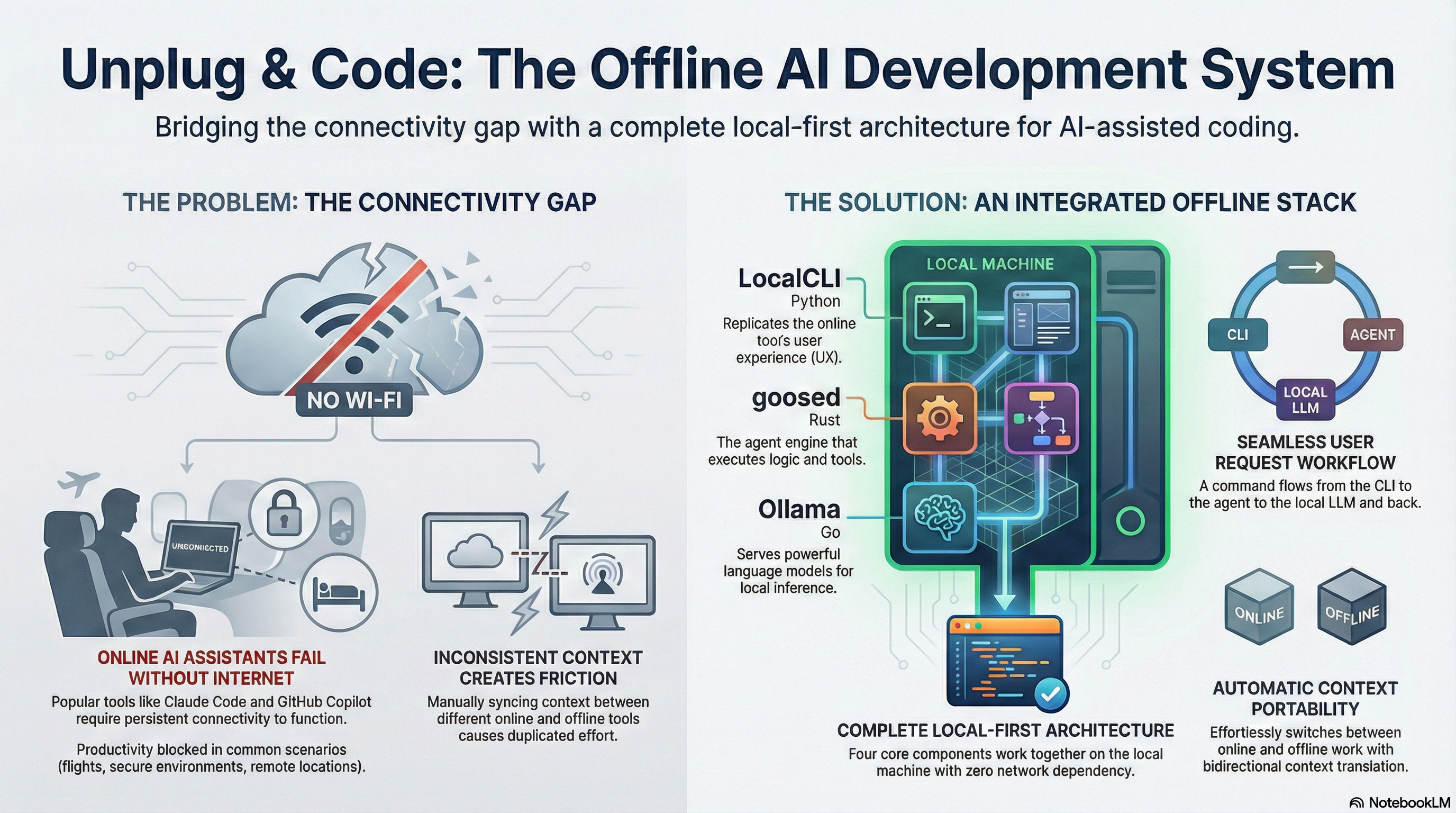
Run the same powerful AI coding agents offline with Goose + Ollama. LocalCLI provides the Claude Code interface you know. No API costs, no internet required, complete privacy.
Watch how Goose Local brings offline AI coding capabilities to your workflow
Coding Unchained - Offline AI Development
Works on planes, in tunnels, anywhere without WiFi
All processing happens locally - nothing leaves your machine
No API costs, no subscriptions, no token limits
Same agent library you know, converted for local use
A Python CLI that replicates Claude Code's UX while running entirely offline with Goose + Ollama
Same commands, same approval workflow, same output formatting you know from Claude Code.
/help, /clear, /compact commandsy/n/e/a/? keysSeamlessly switch between Claude Code and Goose with automatic context translation.
CLAUDE.md ↔ .goosehints# Clone and install
git clone https://github.com/advancecyber/localcli.git
cd localcli
pip install -e .
# Run LocalCLI
localcli# macOS
brew install goose
# Linux / WSL
curl -fsSL https://github.com/block/goose/releases/latest/download/install.sh | bash# macOS
brew install ollama
# Linux
curl -fsSL https://ollama.ai/install.sh | sh
# Start Ollama service
ollama serve# Recommended: Qwen3 Coder 30B (best balance)
ollama pull qwen3-coder:30b
# Heavy option: Llama 3.3 70B (needs 48GB+ VRAM)
ollama pull llama3.3:70b# Run configuration wizard
goose configure
# Select: Configure Providers → Ollama
# Enter OLLAMA_HOST: http://localhost:11434
# Select model: qwen3-coder:30b# Download and extract
wget https://advancecyber.ai/goose-extensions.zip
unzip goose-extensions.zip
cd goose-extensions
# Run setup
./setup.sh# Start interactive session (Claude Code-style REPL)
localcli
# Execute a single command and exit
localcli -e "refactor the auth module"
# Use a different model
localcli -m llama3.3:70b
# Resume a previous session
localcli -r abc123
# Inside the REPL - familiar commands
> /help # Show available commands
> /clear # Clear conversation
> /compact # Summarize contextAll public agents and skills converted to Goose recipe format
| Feature | Claude Code | Goose Local |
|---|---|---|
| Model Quality | Claude Sonnet/Opus (state-of-art) | Qwen Coder (~90% of Claude) |
| Connectivity | Requires internet | Works fully offline |
| Cost | API usage fees | Free (your hardware) |
| Privacy | Data sent to Anthropic | 100% local |
| Context Window | 200K tokens | 32K-128K (model dependent) |
qwen3-coder:30b
llama3.3:70b
Tip: Apple Silicon Macs with unified memory work great. The qwen3-coder:30b model runs well on M3 Max with 64GB.
Download the extensions package and start coding offline in minutes.
Download goose-extensions.zip74 recipes • Setup script included • Works offline
The Offline Code Twin architecture - complete AI coding capabilities without internet connectivity
Click to view the full PDF documentation