System Architecture
A comprehensive view of the Claude Code Memory System infrastructure
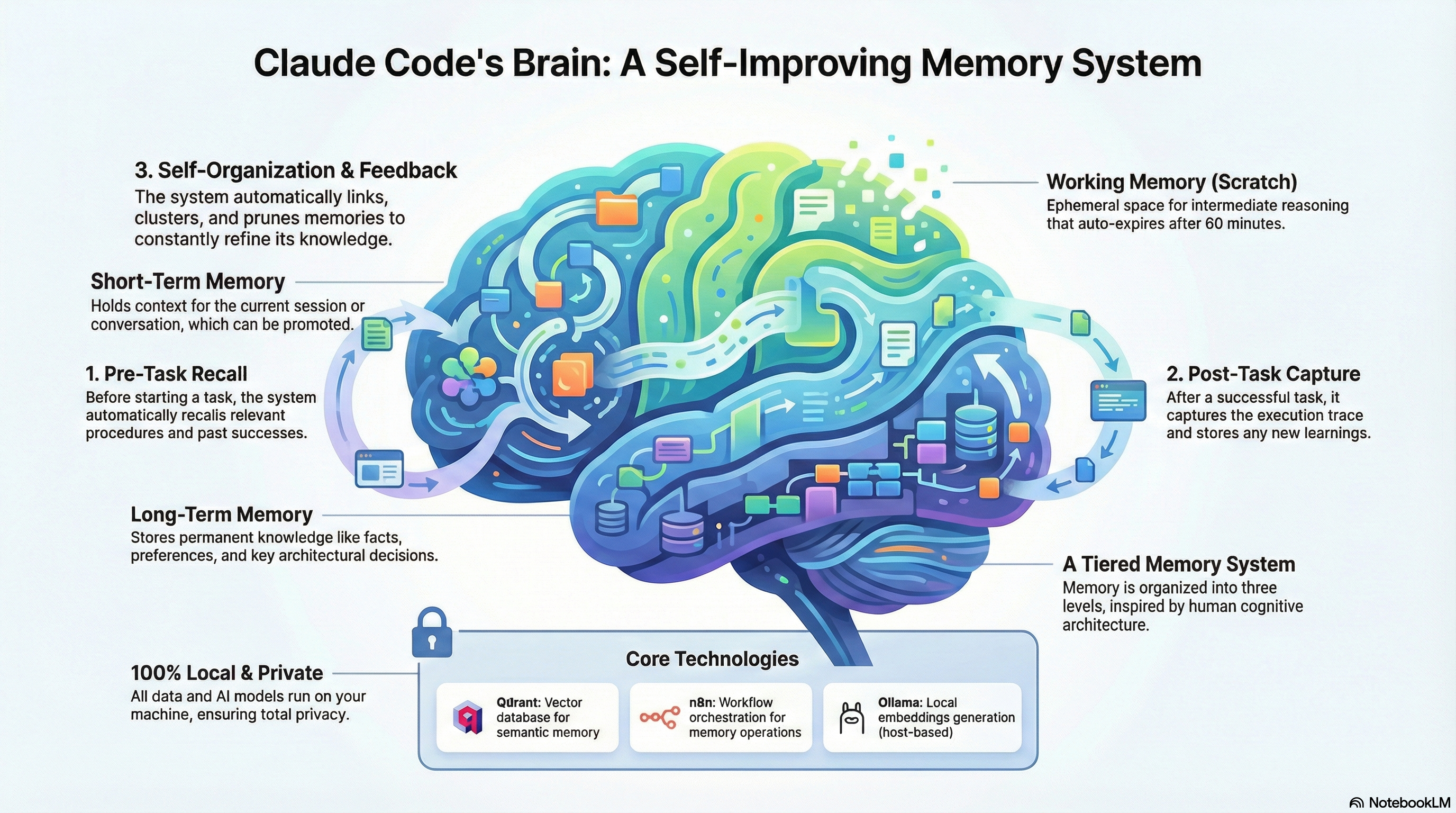
Click to view the full PDF documentation
Give Claude Code a permanent memory that persists across sessions. Self-hosted, privacy-first, and completely under your control.
Explore the complete Compounding Intelligence framework that powers persistent memory across sessions
Watch how the Claude Code Memory System brings persistent memory to your AI coding assistant
Claude Code Memory System Overview
Claude Code is powerful, but it forgets everything between sessions. This system fixes that.
Everything runs on your machine. No cloud services, no data leaving your control.
Preferences, decisions, project context - Claude recalls it all automatically.
Vector embeddings enable intelligent recall based on meaning, not just keywords.
A simple but powerful pipeline powered by n8n workflow automation
Calls MCP tools to store or recall memories
Sends webhook request to n8n
Workflow engine persists state to PostgreSQL
Generates embeddings, stores/queries vectors
Results returned to Claude Code
The n8n workflow ("Claude Memory Gateway") handles all the complexity - embedding generation, vector operations, and response formatting. PostgreSQL stores n8n workflows, credentials, and execution history.
Everything you need for intelligent, persistent AI memory
Store preferences, facts, decisions, and context with semantic embeddings for intelligent retrieval.
Natural language search across all stored memories using vector similarity matching.
Index and search your local documents (Obsidian, markdown, etc.) with semantic understanding.
Ollama runs embedding models locally. Your data never touches external servers.
High-performance vector database with API key authentication for secure, fast similarity search.
Reliable PostgreSQL database stores n8n workflows, credentials, execution history, and system state.
Powerful workflow automation via n8n handles all memory operations, embedding generation, and Qdrant communication.
Native Model Context Protocol server that Claude Code uses automatically. No manual API calls needed.
Advanced memory tools that make Claude smarter over time through learning loops
Track work sessions as episodes with start/end, linking all actions to a coherent narrative.
Store execution traces with key decisions as few-shot examples for future similar tasks.
Capture reusable step-by-step procedures that work across projects.
Store domain-specific insights, gotchas, and lessons learned for future reference.
Track agent performance metrics to measure improvement over time.
Cluster similar memories, prune duplicates, and link related information.
Temporary working memory for multi-step tasks before promoting to permanent storage.
Elevate scratch pad items to permanent memory when they prove valuable.
Compress multiple related memories into concise summaries to reduce clutter.
INTELLIGENCE += CONTEXT × TIME
Every success becomes a template for future success. The more you use the system, the smarter it gets.
A fully local, privacy-first memory infrastructure
MCP Client
TypeScript Bridge
Port 5679 • Webhook API
Port 6334 • Vector DB
Port 5432 • n8n Database
Stores n8n workflows, credentials, and execution history.
Port 11434 • Embeddings
Local embeddings via nomic-embed-text model.
What you need before getting started
Docker Desktop or Engine
Local embeddings
Via Docker image
Anthropic CLI
v18 or later
Get your memory system running in minutes
mkdir claude-memory && cd claude-memory
Use the prompt above to have Claude Code generate all the files, or create them manually.
Create a .env file with secure API keys:
# Qdrant Vector Database
QDRANT_API_KEY=your-secure-qdrant-key

# n8n Workflow Engine
WEBHOOK_API_KEY=your-secure-webhook-key
N8N_ENCRYPTION_KEY=your-n8n-encryption-key
N8N_USER_MANAGEMENT_JWT_SECRET=your-jwt-secret

# PostgreSQL Database
POSTGRES_USER=n8n
POSTGRES_PASSWORD=your-postgres-password
POSTGRES_DB=n8n
ollama pull nomic-embed-text
docker-compose up -d
This starts Qdrant (vector DB), n8n (workflow engine), and PostgreSQL.
Open n8n at http://localhost:5679 and create the "Claude Memory Gateway" workflow with:
/webhook/memoryAsk Claude Code to generate the complete workflow JSON for you.
cd claude-memory-mcp
npm install && npm run build
Then add the MCP server to your Claude Code configuration (~/.mcp.json).
Restart Claude Code to load the MCP server. Claude will now automatically store and recall memories!
Organize information with semantic categorization
User preferences, tool choices, coding style, editor settings
Project facts, configurations, server details, important info
Project context, workflows, processes, background info
Architectural decisions, technology choices, rationale
Already have Claude Code? Use this prompt to have Claude help you set up the entire memory system:
Help me set up a local persistent memory system for Claude Code. I need you to create everything from scratch:

1. **docker-compose.yml** with:
   - Qdrant vector database (port 6334) with API key authentication
   - n8n workflow engine (port 5679)
   - PostgreSQL database (port 5432) for n8n persistence
   - Shared Docker network, persistent volumes, environment variables

2. **.env file** with secure keys for Qdrant API, n8n webhook auth, and PostgreSQL credentials

3. **n8n workflow** ("Claude Memory Gateway") that:
   - Receives webhooks at /webhook/memory
   - Routes store/recall/rag_search actions
   - Calls Ollama (host.docker.internal:11434) for embeddings using nomic-embed-text
   - Stores/queries vectors in Qdrant

4. **TypeScript MCP server** with these tools:
   - memory_store: Save memories with type (preference/fact/context/decision) and tags
   - memory_recall: Semantic search across stored memories
   - rag_search: Search indexed documents

The system must be 100% local - no cloud services. All data stays on my machine.
Claude will walk you through creating each component step by step, customized to your setup.
Every file you need to build the memory system from scratch
Docker services: PostgreSQL, Qdrant, n8n
version: '3.8'

# Claude Memory System - Local Infrastructure
# PostgreSQL + Qdrant + n8n

volumes:
  n8n_data:
  postgres_data:
  qdrant_data:

networks:
  claude_memory:
    driver: bridge

services:
  # PostgreSQL Database for n8n persistence
  postgres:
    image: postgres:16-alpine
    container_name: claude_memory_postgres
    restart: unless-stopped
    networks:
      - claude_memory
    environment:
      POSTGRES_USER: ${POSTGRES_USER}
      POSTGRES_PASSWORD: ${POSTGRES_PASSWORD}
      POSTGRES_DB: ${POSTGRES_DB}
    volumes:
      - postgres_data:/var/lib/postgresql/data
    healthcheck:
      test: ['CMD-SHELL', 'pg_isready -h localhost -U ${POSTGRES_USER} -d ${POSTGRES_DB}']
      interval: 5s
      timeout: 5s
      retries: 10

  # Qdrant Vector Database with API Key Authentication
  qdrant:
    image: qdrant/qdrant:latest
    container_name: claude_memory_qdrant
    restart: unless-stopped
    networks:
      - claude_memory
    ports:
      - "6334:6333"
    environment:
      QDRANT__SERVICE__API_KEY: ${QDRANT_API_KEY}
    volumes:
      - qdrant_data:/qdrant/storage

  # n8n Workflow Engine
  n8n:
    image: n8nio/n8n:latest
    container_name: claude_memory_n8n
    restart: unless-stopped
    networks:
      - claude_memory
    ports:
      - "5679:5678"
    extra_hosts:
      - "host.docker.internal:host-gateway"
    environment:
      - DB_TYPE=postgresdb
      - DB_POSTGRESDB_HOST=postgres
      - DB_POSTGRESDB_PORT=5432
      - DB_POSTGRESDB_DATABASE=${POSTGRES_DB}
      - DB_POSTGRESDB_USER=${POSTGRES_USER}
      - DB_POSTGRESDB_PASSWORD=${POSTGRES_PASSWORD}
      - N8N_ENCRYPTION_KEY=${N8N_ENCRYPTION_KEY}
      - N8N_USER_MANAGEMENT_JWT_SECRET=${N8N_USER_MANAGEMENT_JWT_SECRET}
      - N8N_DIAGNOSTICS_ENABLED=false
      - N8N_PERSONALIZATION_ENABLED=false
      - N8N_SECURE_COOKIE=false
      - N8N_PUBLIC_API_ENABLED=true
      - N8N_BLOCK_ENV_ACCESS_IN_NODE=false
      - WEBHOOK_URL=http://localhost:5679
      # Security keys for workflow
      - QDRANT_API_KEY=${QDRANT_API_KEY}
      - WEBHOOK_API_KEY=${WEBHOOK_API_KEY}
      # Host Ollama accessible via host.docker.internal
      - OLLAMA_HOST=http://host.docker.internal:11434
    volumes:
      - n8n_data:/home/node/.n8n
    depends_on:
      postgres:
        condition: service_healthy
      qdrant:
        condition: service_started
Environment variables (generate your own keys!)
# Claude Memory System Environment Configuration
# SECURITY: Generate your own secure keys!

# Qdrant Vector Database
QDRANT_API_KEY=your-secure-64-char-hex-key-here

# n8n Webhook Authentication
WEBHOOK_API_KEY=your-secure-64-char-hex-key-here

# n8n Encryption (generate with: openssl rand -hex 32)
N8N_ENCRYPTION_KEY=your-secure-64-char-hex-key-here
N8N_USER_MANAGEMENT_JWT_SECRET=your-secure-64-char-hex-key-here

# PostgreSQL Database
POSTGRES_USER=claude_memory
POSTGRES_PASSWORD=your-secure-postgres-password
POSTGRES_DB=claude_memory

# Ollama Configuration (uses host system)
OLLAMA_HOST=http://localhost:11434
Generate secure keys: openssl rand -hex 32
MCP Server - The bridge between Claude Code and n8n
#!/usr/bin/env node

import { McpServer } from "@modelcontextprotocol/sdk/server/mcp.js";
import { StdioServerTransport } from "@modelcontextprotocol/sdk/server/stdio.js";
import { z } from "zod";

// Configuration
const WEBHOOK_URL = process.env.MEMORY_WEBHOOK_URL || "http://localhost:5679/webhook/memory";
const WEBHOOK_API_KEY = process.env.MEMORY_WEBHOOK_API_KEY || "";

// Memory type enum
const MemoryType = z.enum(["preference", "fact", "context", "decision"]);

// Input schemas
const StoreMemorySchema = z.object({
  content: z.string().describe("The information to store in memory"),
  type: MemoryType.describe("Category: preference, fact, context, or decision"),
  tags: z.array(z.string()).optional().describe("Tags for organizing"),
  project: z.string().optional().default("global").describe("Project scope"),
});

const RecallMemorySchema = z.object({
  query: z.string().describe("Natural language search query"),
  limit: z.number().optional().default(5).describe("Max memories to return"),
});

const RagSearchSchema = z.object({
  query: z.string().describe("Query to search documents"),
  limit: z.number().optional().default(5).describe("Max chunks to return"),
  threshold: z.number().optional().default(0.4).describe("Min similarity (0-1)"),
});

// Webhook caller
async function callWebhook(action: string, payload: Record<string, unknown>): Promise<unknown> {
  const response = await fetch(WEBHOOK_URL, {
    method: "POST",
    headers: {
      "Content-Type": "application/json",
      "x-api-key": WEBHOOK_API_KEY,
    },
    body: JSON.stringify({ action, ...payload }),
  });

  if (!response.ok) {
    const errorText = await response.text();
    throw new Error(`Webhook failed: ${response.status} - ${errorText}`);
  }
  return response.json();
}

// Create server
const server = new McpServer({
  name: "claude-memory",
  version: "1.0.0",
});

// Register memory_store tool
server.tool(
  "memory_store",
  "Store information in persistent memory with semantic embeddings",
  StoreMemorySchema.shape,
  async (args) => {
    try {
      const result = await callWebhook("store", {
        content: args.content,
        type: args.type,
        tags: args.tags || [],
      });
      return {
        content: [{ type: "text" as const, text: JSON.stringify(result, null, 2) }],
      };
    } catch (error) {
      const msg = error instanceof Error ? error.message : "Unknown error";
      return {
        content: [{ type: "text" as const, text: `Error: ${msg}` }],
        isError: true,
      };
    }
  }
);

// Register memory_recall tool
server.tool(
  "memory_recall",
  "Search stored memories using semantic similarity",
  RecallMemorySchema.shape,
  async (args) => {
    try {
      const result = await callWebhook("recall", {
        query: args.query,
        limit: args.limit || 5,
        threshold: 0.5,
      });
      return {
        content: [{ type: "text" as const, text: JSON.stringify(result, null, 2) }],
      };
    } catch (error) {
      const msg = error instanceof Error ? error.message : "Unknown error";
      return {
        content: [{ type: "text" as const, text: `Error: ${msg}` }],
        isError: true,
      };
    }
  }
);

// Register rag_search tool
server.tool(
  "rag_search",
  "Search documents using semantic similarity",
  RagSearchSchema.shape,
  async (args) => {
    try {
      const result = await callWebhook("rag_search", {
        query: args.query,
        limit: args.limit || 5,
        threshold: args.threshold || 0.4,
      });
      return {
        content: [{ type: "text" as const, text: JSON.stringify(result, null, 2) }],
      };
    } catch (error) {
      const msg = error instanceof Error ? error.message : "Unknown error";
      return {
        content: [{ type: "text" as const, text: `Error: ${msg}` }],
        isError: true,
      };
    }
  }
);

// Start server
async function main() {
  const transport = new StdioServerTransport();
  await server.connect(transport);
  console.error("Claude Memory MCP Server running");
}

main().catch((error) => {
  console.error("Fatal error:", error);
  process.exit(1);
});
MCP Server dependencies
{
  "name": "claude-memory-mcp",
  "version": "1.0.0",
  "type": "module",
  "main": "dist/index.js",
  "bin": {
    "claude-memory-mcp": "dist/index.js"
  },
  "scripts": {
    "build": "tsc",
    "start": "node dist/index.js"
  },
  "dependencies": {
    "@modelcontextprotocol/sdk": "^1.0.0",
    "zod": "^3.23.0"
  },
  "devDependencies": {
    "@types/node": "^20.0.0",
    "typescript": "^5.0.0"
  }
}
TypeScript configuration
{
  "compilerOptions": {
    "target": "ES2022",
    "module": "NodeNext",
    "moduleResolution": "NodeNext",
    "outDir": "./dist",
    "rootDir": "./src",
    "strict": true,
    "esModuleInterop": true,
    "skipLibCheck": true,
    "forceConsistentCasingInFileNames": true
  },
  "include": ["src/**/*"],
  "exclude": ["node_modules", "dist"]
}
Initialize Qdrant collections
#!/bin/bash

# Initialize Qdrant collections for Claude Memory System
# Run after docker-compose up -d

QDRANT_URL="http://localhost:6334"
QDRANT_API_KEY="${QDRANT_API_KEY:-your-api-key}"

# Create claude_memories collection (768 dimensions for nomic-embed-text)
curl -X PUT "$QDRANT_URL/collections/claude_memories" \
  -H "api-key: $QDRANT_API_KEY" \
  -H "Content-Type: application/json" \
  -d '{
    "vectors": {
      "size": 768,
      "distance": "Cosine"
    }
  }'

echo ""
echo "Collection claude_memories created!"

# Optional: Create obsidian_docs collection for RAG
curl -X PUT "$QDRANT_URL/collections/obsidian_docs" \
  -H "api-key: $QDRANT_API_KEY" \
  -H "Content-Type: application/json" \
  -d '{
    "vectors": {
      "size": 768,
      "distance": "Cosine"
    }
  }'

echo ""
echo "Collection obsidian_docs created!"
Claude Code MCP server configuration
{
  "mcpServers": {
    "claude-memory": {
      "command": "node",
      "args": ["/path/to/claude-memory-mcp/dist/index.js"],
      "env": {
        "MEMORY_WEBHOOK_URL": "http://localhost:5679/webhook/memory",
        "MEMORY_WEBHOOK_API_KEY": "your-webhook-api-key-here"
      }
    }
  }
}
Update /path/to/ with your actual installation path and add your API key.
Import this directly into n8n at http://localhost:5679
{
  "name": "Claude Memory Gateway",
  "nodes": [
    {
      "parameters": {
        "httpMethod": "POST",
        "path": "memory",
        "responseMode": "responseNode",
        "options": {}
      },
      "id": "webhook",
      "name": "Memory Webhook",
      "type": "n8n-nodes-base.webhook",
      "typeVersion": 2,
      "position": [250, 300],
      "webhookId": "claude-memory"
    },
    {
      "parameters": {
        "conditions": {
          "options": { "caseSensitive": true, "leftValue": "", "typeValidation": "strict" },
          "conditions": [{
            "id": "api-key-check",
            "leftValue": "={{ $json.headers['x-api-key'] }}",
            "rightValue": "={{ $env.WEBHOOK_API_KEY }}",
            "operator": { "type": "string", "operation": "equals" }
          }],
          "combinator": "and"
        },
        "options": {}
      },
      "id": "auth-check",
      "name": "Validate API Key",
      "type": "n8n-nodes-base.if",
      "typeVersion": 2,
      "position": [450, 300]
    },
    {
      "parameters": {
        "respondWith": "json",
        "responseBody": "={{ JSON.stringify({ error: 'Unauthorized', message: 'Invalid or missing API key' }) }}",
        "options": { "responseCode": 401, "responseHeaders": { "entries": [{ "name": "Content-Type", "value": "application/json" }] } }
      },
      "id": "unauthorized-response",
      "name": "Unauthorized Response",
      "type": "n8n-nodes-base.respondToWebhook",
      "typeVersion": 1.1,
      "position": [650, 500]
    },
    {
      "parameters": {
        "rules": {
          "values": [
            {
              "conditions": { "options": { "caseSensitive": true, "leftValue": "", "typeValidation": "strict" },
                "conditions": [{ "leftValue": "={{ $json.body.action }}", "rightValue": "store", "operator": { "type": "string", "operation": "equals" } }],
                "combinator": "and"
              },
              "renameOutput": true, "outputKey": "store"
            },
            {
              "conditions": { "options": { "caseSensitive": true, "leftValue": "", "typeValidation": "strict" },
                "conditions": [{ "leftValue": "={{ $json.body.action }}", "rightValue": "recall", "operator": { "type": "string", "operation": "equals" } }],
                "combinator": "and"
              },
              "renameOutput": true, "outputKey": "recall"
            },
            {
              "conditions": { "options": { "caseSensitive": true, "leftValue": "", "typeValidation": "strict" },
                "conditions": [{ "leftValue": "={{ $json.body.action }}", "rightValue": "rag_search", "operator": { "type": "string", "operation": "equals" } }],
                "combinator": "and"
              },
              "renameOutput": true, "outputKey": "rag_search"
            }
          ]
        },
        "options": {}
      },
      "id": "action-router",
      "name": "Route Action",
      "type": "n8n-nodes-base.switch",
      "typeVersion": 3,
      "position": [650, 300]
    },
    {
      "parameters": {
        "method": "POST",
        "url": "http://host.docker.internal:11434/api/embeddings",
        "sendBody": true,
        "specifyBody": "json",
        "jsonBody": "={{ JSON.stringify({ model: 'nomic-embed-text', prompt: $json.body.content }) }}",
        "options": {}
      },
      "id": "store-embedding",
      "name": "Generate Store Embedding",
      "type": "n8n-nodes-base.httpRequest",
      "typeVersion": 4.2,
      "position": [900, 150]
    },
    {
      "parameters": {
        "method": "POST",
        "url": "http://host.docker.internal:11434/api/embeddings",
        "sendBody": true,
        "specifyBody": "json",
        "jsonBody": "={{ JSON.stringify({ model: 'nomic-embed-text', prompt: $json.body.query }) }}",
        "options": {}
      },
      "id": "recall-embedding",
      "name": "Generate Recall Embedding",
      "type": "n8n-nodes-base.httpRequest",
      "typeVersion": 4.2,
      "position": [900, 300]
    },
    {
      "parameters": {
        "method": "POST",
        "url": "http://host.docker.internal:11434/api/embeddings",
        "sendBody": true,
        "specifyBody": "json",
        "jsonBody": "={{ JSON.stringify({ model: 'nomic-embed-text', prompt: $json.body.query }) }}",
        "options": {}
      },
      "id": "rag-embedding",
      "name": "Generate RAG Embedding",
      "type": "n8n-nodes-base.httpRequest",
      "typeVersion": 4.2,
      "position": [900, 450]
    },
    {
      "parameters": {
        "jsCode": "const webhookData = $('Memory Webhook').first().json;\nconst embedding = $input.first().json.embedding;\n\nfunction generateUUID() {\n  return 'xxxxxxxx-xxxx-4xxx-yxxx-xxxxxxxxxxxx'.replace(/[xy]/g, function(c) {\n    const r = Math.random() * 16 | 0;\n    const v = c === 'x' ? r : (r & 0x3 | 0x8);\n    return v.toString(16);\n  });\n}\n\nconst pointId = webhookData.body.id || generateUUID();\n\nreturn {\n  pointId: pointId,\n  embedding: embedding,\n  content: webhookData.body.content,\n  type: webhookData.body.type || 'memory',\n  tags: webhookData.body.tags || [],\n  created_at: new Date().toISOString()\n};"
      },
      "id": "prepare-store",
      "name": "Prepare Store Request",
      "type": "n8n-nodes-base.code",
      "typeVersion": 2,
      "position": [1050, 150]
    },
    {
      "parameters": {
        "method": "PUT",
        "url": "http://qdrant:6333/collections/claude_memories/points",
        "sendHeaders": true,
        "headerParameters": { "parameters": [{ "name": "api-key", "value": "={{ $env.QDRANT_API_KEY }}" }, { "name": "Content-Type", "value": "application/json" }] },
        "sendBody": true,
        "specifyBody": "json",
        "jsonBody": "={{ JSON.stringify({ points: [{ id: $json.pointId, vector: $json.embedding, payload: { content: $json.content, type: $json.type, created_at: $json.created_at, tags: $json.tags } }] }) }}",
        "options": {}
      },
      "id": "store-qdrant",
      "name": "Store in Qdrant",
      "type": "n8n-nodes-base.httpRequest",
      "typeVersion": 4.2,
      "position": [1200, 150]
    },
    {
      "parameters": {
        "method": "POST",
        "url": "http://qdrant:6333/collections/claude_memories/points/search",
        "sendHeaders": true,
        "headerParameters": { "parameters": [{ "name": "api-key", "value": "={{ $env.QDRANT_API_KEY }}" }, { "name": "Content-Type", "value": "application/json" }] },
        "sendBody": true,
        "specifyBody": "json",
        "jsonBody": "={{ JSON.stringify({ vector: $json.embedding, limit: $('Memory Webhook').item.json.body.limit || 5, with_payload: true, score_threshold: $('Memory Webhook').item.json.body.threshold || 0.7 }) }}",
        "options": {}
      },
      "id": "search-qdrant",
      "name": "Search Qdrant",
      "type": "n8n-nodes-base.httpRequest",
      "typeVersion": 4.2,
      "position": [1100, 300]
    },
    {
      "parameters": {
        "method": "POST",
        "url": "http://qdrant:6333/collections/obsidian_docs/points/search",
        "sendHeaders": true,
        "headerParameters": { "parameters": [{ "name": "api-key", "value": "={{ $env.QDRANT_API_KEY }}" }, { "name": "Content-Type", "value": "application/json" }] },
        "sendBody": true,
        "specifyBody": "json",
        "jsonBody": "={{ JSON.stringify({ vector: $json.embedding, limit: $('Memory Webhook').item.json.body.limit || 10, with_payload: true, score_threshold: $('Memory Webhook').item.json.body.threshold || 0.5 }) }}",
        "options": {}
      },
      "id": "search-rag-qdrant",
      "name": "Search Obsidian Docs",
      "type": "n8n-nodes-base.httpRequest",
      "typeVersion": 4.2,
      "position": [1100, 450]
    },
    {
      "parameters": {
        "respondWith": "json",
        "responseBody": "={{ JSON.stringify({ success: true, message: 'Memory stored successfully', id: $('Prepare Store Request').first().json.pointId }) }}",
        "options": { "responseCode": 200, "responseHeaders": { "entries": [{ "name": "Content-Type", "value": "application/json" }] } }
      },
      "id": "store-response",
      "name": "Store Success Response",
      "type": "n8n-nodes-base.respondToWebhook",
      "typeVersion": 1.1,
      "position": [1400, 150]
    },
    {
      "parameters": {
        "respondWith": "json",
        "responseBody": "={{ JSON.stringify({ success: true, memories: $json.result.map(r => ({ id: r.id, score: r.score, content: r.payload.content, type: r.payload.type, created_at: r.payload.created_at, tags: r.payload.tags })) }) }}",
        "options": { "responseCode": 200, "responseHeaders": { "entries": [{ "name": "Content-Type", "value": "application/json" }] } }
      },
      "id": "recall-response",
      "name": "Recall Success Response",
      "type": "n8n-nodes-base.respondToWebhook",
      "typeVersion": 1.1,
      "position": [1300, 300]
    },
    {
      "parameters": {
        "respondWith": "json",
        "responseBody": "={{ JSON.stringify({ success: true, documents: $json.result.map(r => ({ id: r.id, score: r.score, file_path: r.payload.file_path, title: r.payload.title, content: r.payload.content, chunk_index: r.payload.chunk_index, total_chunks: r.payload.total_chunks })) }) }}",
        "options": { "responseCode": 200, "responseHeaders": { "entries": [{ "name": "Content-Type", "value": "application/json" }] } }
      },
      "id": "rag-response",
      "name": "RAG Success Response",
      "type": "n8n-nodes-base.respondToWebhook",
      "typeVersion": 1.1,
      "position": [1300, 450]
    }
  ],
  "connections": {
    "Memory Webhook": { "main": [[{ "node": "Validate API Key", "type": "main", "index": 0 }]] },
    "Validate API Key": { "main": [[{ "node": "Route Action", "type": "main", "index": 0 }], [{ "node": "Unauthorized Response", "type": "main", "index": 0 }]] },
    "Route Action": { "main": [[{ "node": "Generate Store Embedding", "type": "main", "index": 0 }], [{ "node": "Generate Recall Embedding", "type": "main", "index": 0 }], [{ "node": "Generate RAG Embedding", "type": "main", "index": 0 }]] },
    "Generate Store Embedding": { "main": [[{ "node": "Prepare Store Request", "type": "main", "index": 0 }]] },
    "Prepare Store Request": { "main": [[{ "node": "Store in Qdrant", "type": "main", "index": 0 }]] },
    "Generate Recall Embedding": { "main": [[{ "node": "Search Qdrant", "type": "main", "index": 0 }]] },
    "Generate RAG Embedding": { "main": [[{ "node": "Search Obsidian Docs", "type": "main", "index": 0 }]] },
    "Store in Qdrant": { "main": [[{ "node": "Store Success Response", "type": "main", "index": 0 }]] },
    "Search Qdrant": { "main": [[{ "node": "Recall Success Response", "type": "main", "index": 0 }]] },
    "Search Obsidian Docs": { "main": [[{ "node": "RAG Success Response", "type": "main", "index": 0 }]] }
  },
  "settings": { "executionOrder": "v1" },
  "active": true
}
To import: Go to n8n → Workflows → Import from File/URL → Paste this JSON. Then activate the workflow!
Set up your own local memory system and transform how you work with Claude Code.
Download NowA comprehensive view of the Claude Code Memory System infrastructure
Click to view the full PDF documentation