1. Problem Statement
Claude Code's context window is finite. After 150K tokens, conversations compress or reset, losing valuable learnings. The Context Guard system (CLAUDE.md + MEMORY.md) solves this for curated, high-priority facts, but it doesn't handle:
- Unstructured learnings: "Tried approach X, didn't work because Y" (valuable context, but doesn't belong in MEMORY.md).
- Cross-project patterns: "This rate limiting pattern works across 5 projects" (too broad for a single MEMORY.md).
- Semantic search: "What did we learn about Docker networking?" (MEMORY.md is grep-only, not semantic).
- Automated recall: "When I mention auth, auto-load all auth-related learnings" (MEMORY.md requires manual topic files).
The Vector Memory System complements Context Guard by providing:
- Semantic search — find "Docker networking issues" even if the stored text says "container connectivity problems"
- Cross-session persistence — learnings survive conversation resets and are recalled automatically
- Multi-collection organization — long_term (facts), procedures (step-by-step guides), learnings (insights), episodes (debugging history)
- Auto-recall hooks — when a new conversation starts, auto-load relevant memories based on project context
- Deduplication — before storing a new memory, check for near-duplicates and merge instead of creating redundant entries
This is NOT a replacement for MEMORY.md. High-priority, always-relevant facts still go in MEMORY.md. Vector memory is for lower-priority, contextual learnings that load on-demand via semantic search.
2. Architecture Overview
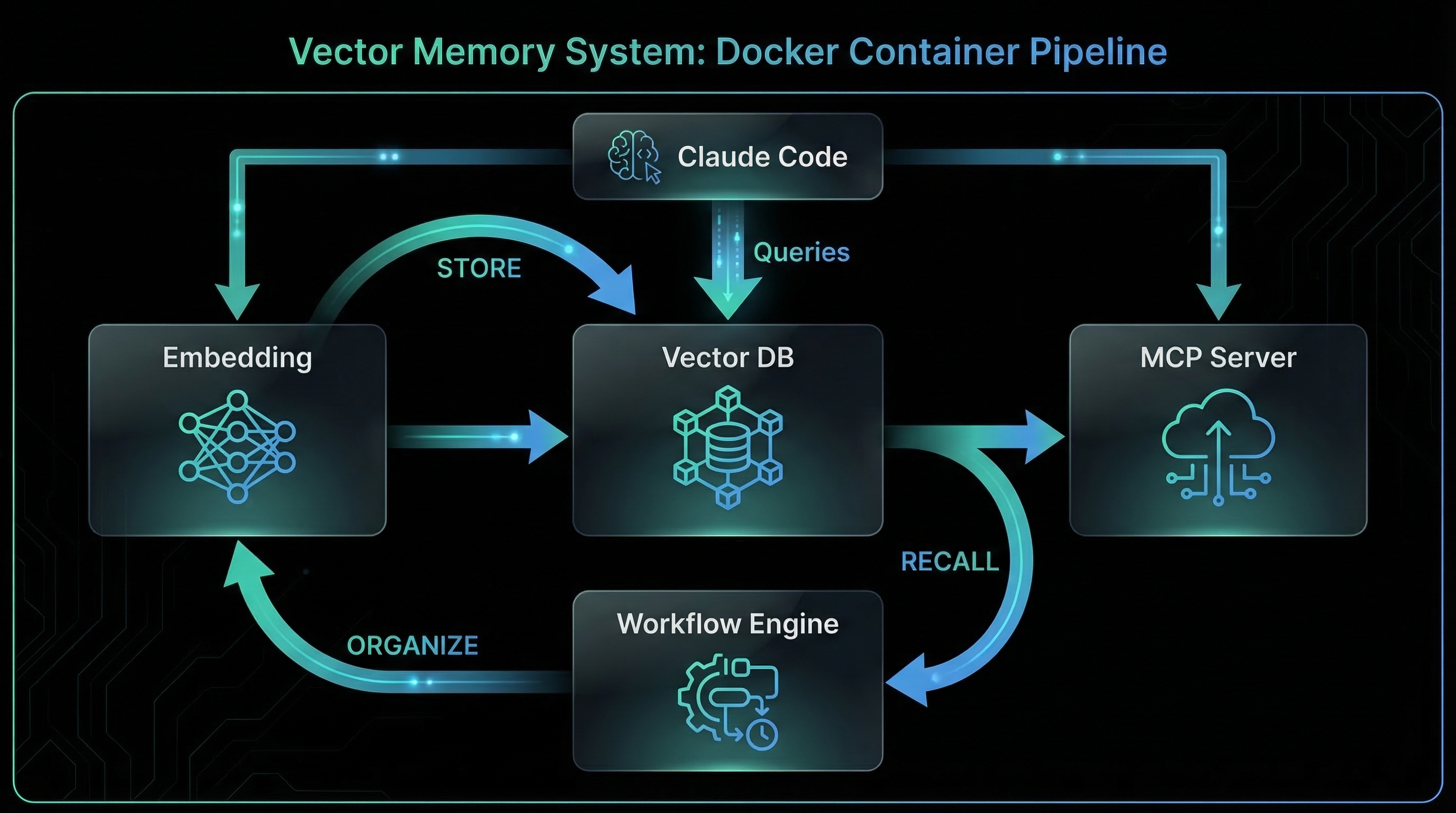
3. Key Components
3.1 Qdrant Vector Database
Qdrant is a high-performance vector similarity search engine. It stores embeddings (768-dimensional vectors from Ollama) and supports:
- Collections: Separate namespaces for different memory types (long_term, learnings, procedures)
- Cosine similarity search: Find memories similar to a query embedding
- Metadata filtering: Search within a project, date range, or tag
- Payload storage: Store original text, timestamps, tags, confidence scores alongside vectors
- HNSW indexing: Fast approximate nearest neighbor search (sub-millisecond queries)
Docker service configuration:
qdrant:
  container_name: qdrant
  image: qdrant/qdrant:latest
  restart: unless-stopped
  ports:
    - "6334:6333"  # Expose on 6334 to avoid conflicts
  environment:
    QDRANT__SERVICE__API_KEY: ${QDRANT_API_KEY}
  volumes:
    - qdrant-data:/qdrant/storage  # Persistent storage
Collection schema example (claude_memories):
{
  "vectors": {
    "size": 768,           // nomic-embed-text dimensionality
    "distance": "Cosine"   // Similarity metric
  },
  "payload_schema": {
    "text": "keyword",     // Original memory text
    "project": "keyword",  // Project identifier
    "type": "keyword",     // fact|learning|procedure|episode
    "tags": "keyword[]",   // Searchable tags
    "confidence": "float", // 0.0-1.0 relevance score
    "created_at": "datetime",
    "last_accessed": "datetime"
  }
}
3.2 Ollama Embedding Service
Ollama runs locally on the host machine (NOT in Docker) and provides the nomic-embed-text model for converting text into 768-dimensional vectors.
Why nomic-embed-text?
- Small (274 MB) — fast download and inference
- High-quality embeddings — competitive with OpenAI's text-embedding-3-small
- Local inference — no API costs, no rate limits, no data leakage
- 768 dimensions — good balance between quality and speed
Docker access pattern:
n8n:
  environment:
    - OLLAMA_HOST=http://host.docker.internal:11434
  extra_hosts:
    - "host.docker.internal:host-gateway"
Embedding API call from n8n:
POST http://host.docker.internal:11434/api/embeddings
{
  "model": "nomic-embed-text",
  "prompt": "Docker bridge networks can't resolve .local domains"
}

Response:
{
  "embedding": [0.023, -0.145, 0.892, ...],  // 768 floats
  "model": "nomic-embed-text"
}
3.3 PostgreSQL Metadata Store
PostgreSQL stores relational metadata that doesn't fit Qdrant's vector-first model:
- memory_links: Cross-references between memories (e.g., "This learning builds on procedure X")
- memory_audit: Who stored/recalled/deleted what, when
- n8n workflow metadata: Execution history, error logs
Docker service configuration:
claude-postgres:
  container_name: claude-postgres
  image: postgres:16-alpine
  restart: unless-stopped
  ports:
    - "5436:5432"
  environment:
    POSTGRES_USER: ${POSTGRES_USER}
    POSTGRES_PASSWORD: ${POSTGRES_PASSWORD}
    POSTGRES_DB: ${POSTGRES_DB}
  volumes:
    - claude-postgres-data:/var/lib/postgresql/data
  healthcheck:
    test: ['CMD-SHELL', 'pg_isready -h localhost -U ${POSTGRES_USER}']
    interval: 5s
    timeout: 5s
    retries: 10
Example schema (memory_links table):
CREATE TABLE memory_links (
  id UUID PRIMARY KEY DEFAULT gen_random_uuid(),
  source_id UUID NOT NULL,      -- Qdrant point ID (from memory)
  target_id UUID NOT NULL,      -- Qdrant point ID (to memory)
  link_type TEXT NOT NULL,      -- builds_on | contradicts | clarifies
  created_at TIMESTAMPTZ DEFAULT NOW()
);
3.4 n8n Workflow Automation
n8n orchestrates the memory lifecycle with four core workflows:
1. memory-store (webhook → embed → qdrant)
Webhook → Extract text
  ↓
Ollama Embeddings → Generate vector
  ↓
Qdrant Search → Check for duplicates (similarity > 0.92)
  ↓
IF duplicate:
  Qdrant Update → Merge texts, increment confidence
ELSE:
  Qdrant Insert → Store new memory
  ↓
PostgreSQL → Log audit event
2. memory-recall (query → search → rank)
Webhook → Extract query + filters (project, tags)
  ↓
Ollama Embeddings → Generate query vector
  ↓
Qdrant Search → Top 5 results, score > 0.7, filter by project/tags
  ↓
PostgreSQL → Update last_accessed timestamp
  ↓
Return → Formatted results with scores
3. memory-organize (dedup, prune, compress)
Cron Trigger (weekly)
  ↓
Qdrant Scroll → Get all memories
  ↓
For each pair: compute similarity
  IF similarity > 0.92:
    Merge → Combine texts, average vectors, sum confidence
  ↓
Prune → Delete memories with confidence < 0.3 AND unused for 90 days
  ↓
Qdrant Optimize → Rebuild HNSW index
4. memory-forget (delete by ID/tag/date)
Webhook → Extract filters (ID, tags, date_before)
  ↓
Qdrant Delete → Remove matching points
  ↓
PostgreSQL → Log forget event
3.5 MCP Server Integration
The MCP (Model Context Protocol) server exposes memory operations as tools that Claude Code can invoke directly. This eliminates the need for custom plugins.
MCP tools exposed:
memory_store(text, type, tags, project)— store a new memorymemory_recall(query, limit, project, tags)— semantic search for memoriesrag_search(query, collection)— retrieval-augmented generation searchmemory_organize()— trigger dedup/prune workflowmemory_forget(id, tags, date_before)— delete memoriesmemory_summarize(collection)— generate summary of all memories in a collectionprocedure(name, steps)— store a step-by-step procedurelearning(insight, context)— store a learning/gotchaepisode(event, outcome)— store a debugging episodetrajectory(task, steps)— store a task sequence for replay
MCP server implementation (Python FastAPI):
from fastapi import FastAPI
from mcp import MCPServer

app = FastAPI()
mcp = MCPServer(app)

@mcp.tool("memory_store")
async def memory_store(
    text: str,
    type: str = "fact",
    tags: list[str] = [],
    project: str = None
):
    """Store a new memory in the vector database."""
    # Call n8n webhook for memory-store workflow
    response = await call_n8n_webhook(
        "memory-store",
        {"text": text, "type": type, "tags": tags, "project": project}
    )
    return {"status": "stored", "id": response["id"]}

@mcp.tool("memory_recall")
async def memory_recall(
    query: str,
    limit: int = 5,
    project: str = None,
    tags: list[str] = []
):
    """Search for memories semantically."""
    response = await call_n8n_webhook(
        "memory-recall",
        {"query": query, "limit": limit, "project": project, "tags": tags}
    )
    return response["results"]
Claude Code detects MCP tools automatically and makes them available in conversations. No manual configuration needed.
3.6 Memory Plugin Hooks
The memory plugin registers hooks to automate memory lifecycle without user intervention:
1. SessionStart (auto-recall)
Hook: SessionStart
Trigger: New conversation begins
Action:
  1. Detect project context from cwd
  2. Call memory_recall(query="relevant to {project}", limit=5, project={project})
  3. Inject top results into conversation context
  4. Log recall event
2. PreToolUse (dedup check)
Hook: PreToolUse
Trigger: Before calling memory_store
Action:
  1. Extract text to be stored
  2. Call memory_recall(query=text, limit=1)
  3. If top result has similarity > 0.92:
     - Skip storage, return "duplicate detected"
  4. Else: proceed with storage
3. PostToolUse (error lookup)
Hook: PostToolUse
Trigger: After any tool call that errored
Action:
  1. Extract error message
  2. Call memory_recall(query="error: {error_msg}", limit=3, tags=["error"])
  3. If matches found:
     - Inject into context: "Similar error seen before: {resolution}"
  4. Else: suggest storing resolution after fix
4. PreCompact (context save)
Hook: PreCompact
Trigger: Before conversation compression
Action:
  1. Analyze conversation history
  2. Extract: new facts, learnings, procedures, episodes
  3. For each extracted item:
     - Call memory_store with appropriate type and tags
  4. Prompt user: "Saved {N} new memories. Review? [Y/n]"
4. Requirements
The system MUST use Qdrant as the vector database with collections for: claude_memories, short_term_memory, working_memory, learnings, procedures, trajectories, episodes.
The system MUST use Ollama with nomic-embed-text (768 dimensions) for generating embeddings. The model MUST run locally (no external API calls).
The system MUST use cosine similarity as the distance metric for vector search. Qdrant configurations MUST specify distance: "Cosine".
Before storing a new memory, the system MUST check for duplicates using similarity > 0.92. If a duplicate exists, merge the texts and increment confidence instead of creating a new entry.
Each memory point in Qdrant MUST include payload: text (original), project (identifier), type (fact|learning|procedure|episode), tags (array), confidence (float), created_at (datetime), last_accessed (datetime).
The system MUST use PostgreSQL to store memory_links (source_id, target_id, link_type) for cross-references between memories.
The system MUST implement four n8n workflows: memory-store (webhook → embed → qdrant), memory-recall (query → search → rank), memory-organize (dedup/prune), memory-forget (delete).
The system MUST expose MCP tools for: memory_store, memory_recall, rag_search, memory_organize, memory_forget, memory_summarize, procedure, learning, episode, trajectory.
The system MUST register a SessionStart hook that auto-recalls top 5 memories relevant to the current project (similarity > 0.7) and injects them into conversation context.
The system MUST register a PreToolUse hook that checks for duplicates before storing a new memory. If similarity > 0.92, skip storage and return "duplicate detected".
The system MUST register a PostToolUse hook that searches for similar errors in memory when a tool call fails. If matches found, inject resolutions into context.
The system MUST register a PreCompact hook that extracts new facts, learnings, procedures, and episodes from conversation history and stores them via memory_store before compression.
The system MUST run a weekly memory-organize workflow that: (1) merges duplicates (similarity > 0.92), (2) prunes low-confidence memories (< 0.3, unused for 90 days), (3) rebuilds HNSW index.
All memory operations (store, recall, organize, forget) MUST log to PostgreSQL memory_audit table with: user, action, timestamp, affected_ids.
The system MUST support filtering memories by project identifier. memory_recall MUST accept a project parameter and pass it as a Qdrant filter.
The system MUST support tag-based filtering. memory_recall and memory_forget MUST accept a tags parameter and filter Qdrant results by matching tags.
Each memory MUST have a confidence score (0.0-1.0). New memories start at 0.5. Confidence increases when: (1) memory is recalled (accessed), (2) duplicate merged. Confidence decreases over time if unused.
Before storing memories, the system MUST apply redaction rules from CLAUDE.md (if present) to strip: credentials, employer info, PII, financial data, health data.
All Docker services (postgres, qdrant, n8n) MUST have healthcheck configurations. The stack MUST NOT start n8n until postgres and qdrant are healthy.
The system MUST run entirely locally. No external API calls for embeddings (use Ollama), no cloud vector databases (use local Qdrant), no third-party search services.
5. Prompt to Build It
I need to build a persistent vector memory system for Claude Code that provides semantic search, cross-session knowledge persistence, and automated memory lifecycle management. Here's what I need:

## Docker Stack (docker-compose.yml)

1. **PostgreSQL (claude-postgres)**:
   - Image: postgres:16-alpine
   - Port: 5436:5432
   - Volumes: claude-postgres-data (persistent)
   - Healthcheck: pg_isready
   - Tables: memory_links (source_id, target_id, link_type), memory_audit (user, action, timestamp, affected_ids)

2. **Qdrant Vector Database**:
   - Image: qdrant/qdrant:latest
   - Port: 6334:6333
   - Volumes: qdrant-data (persistent)
   - Environment: QDRANT__SERVICE__API_KEY (from .env)
   - Collections: claude_memories, short_term_memory, working_memory, learnings, procedures, trajectories, episodes
   - Schema: vectors (size: 768, distance: Cosine), payload (text, project, type, tags, confidence, created_at, last_accessed)

3. **n8n Workflow Automation**:
   - Image: n8nio/n8n:latest
   - Port: 5679:5678
   - Depends on: claude-postgres (healthy), qdrant (started)
   - Environment: OLLAMA_HOST=http://host.docker.internal:11434
   - Extra hosts: host.docker.internal:host-gateway
   - Volumes: n8n-data (persistent)

## Ollama Setup (Host Machine)

- Model: nomic-embed-text (274 MB, 768 dimensions)
- Install: ollama pull nomic-embed-text
- API: POST http://localhost:11434/api/embeddings
- Input: {"model": "nomic-embed-text", "prompt": "text to embed"}
- Output: {"embedding": [0.023, -0.145, ...], "model": "nomic-embed-text"}

## n8n Workflows

1. **memory-store**:
   - Webhook trigger (POST /webhook/memory-store)
   - Input: {text, type, tags, project}
   - Steps:
     a. Ollama Embeddings → Generate vector
     b. Qdrant Search → Check for duplicates (similarity > 0.92)
     c. IF duplicate: Qdrant Update → Merge texts, increment confidence
     d. ELSE: Qdrant Insert → Store new memory with confidence=0.5
     e. PostgreSQL → Log audit event (action: store)

2. **memory-recall**:
   - Webhook trigger (POST /webhook/memory-recall)
   - Input: {query, limit=5, project, tags}
   - Steps:
     a. Ollama Embeddings → Generate query vector
     b. Qdrant Search → Top N results, score > 0.7, filter by project/tags
     c. PostgreSQL → Update last_accessed timestamp, increment confidence
     d. Return → JSON results with scores

3. **memory-organize**:
   - Cron trigger (weekly)
   - Steps:
     a. Qdrant Scroll → Get all memories
     b. For each pair: compute similarity
        IF similarity > 0.92: Merge (combine texts, average vectors, sum confidence)
     c. Prune → Delete memories with confidence < 0.3 AND last_accessed > 90 days ago
     d. Qdrant Optimize → Rebuild HNSW index

4. **memory-forget**:
   - Webhook trigger (POST /webhook/memory-forget)
   - Input: {id, tags, date_before}
   - Steps:
     a. Qdrant Delete → Remove matching points
     b. PostgreSQL → Log audit event (action: forget)

## MCP Server (Python FastAPI)

Create MCP server that exposes tools:
- memory_store(text, type, tags, project) → calls n8n webhook memory-store
- memory_recall(query, limit, project, tags) → calls n8n webhook memory-recall
- rag_search(query, collection) → semantic search for RAG
- memory_organize() → triggers n8n workflow memory-organize
- memory_forget(id, tags, date_before) → calls n8n webhook memory-forget
- memory_summarize(collection) → generates summary of all memories in collection
- procedure(name, steps) → stores step-by-step procedure in procedures collection
- learning(insight, context) → stores learning in learnings collection
- episode(event, outcome) → stores debugging episode in episodes collection
- trajectory(task, steps) → stores task sequence in trajectories collection

## Memory Plugin Hooks

1. **SessionStart** (auto-recall):
   - Detect project from cwd
   - Call memory_recall(query="relevant to {project}", limit=5, project={project})
   - Inject results into conversation context

2. **PreToolUse** (dedup check):
   - Before memory_store: call memory_recall(query=text, limit=1)
   - If similarity > 0.92: skip storage, return "duplicate"

3. **PostToolUse** (error lookup):
   - After tool error: call memory_recall(query="error: {msg}", limit=3, tags=["error"])
   - If matches: inject resolutions into context

4. **PreCompact** (context save):
   - Extract: facts, learnings, procedures, episodes
   - For each: call memory_store with type and tags
   - Prompt: "Saved {N} memories. Review? [Y/n]"

## Privacy Integration

Before storing, apply redaction rules from CLAUDE.md:
- Strip: credentials, employer info, PII, financial data, health data
- Use regex patterns from CLAUDE.md privacy section

Start with docker-compose.yml for postgres + qdrant + n8n, then build the memory-store workflow.
6. Design Decisions
6.1 Why Qdrant Instead of Pinecone/Weaviate?
Decision: Use Qdrant as the vector database instead of cloud alternatives like Pinecone or Weaviate Cloud.
Rationale:
- Local-first: Qdrant runs in Docker. No external API calls, no data leakage, no vendor lock-in.
- Performance: HNSW indexing provides sub-millisecond search at 100K+ vectors scale.
- Cost: Zero ongoing costs. Pinecone charges per vector stored and per query.
- Privacy: Sensitive project context never leaves your machine.
Trade-off: No built-in replication or multi-node clustering. For personal use, single-node Qdrant is sufficient. For team use, consider Qdrant Cloud or self-hosted cluster.
6.2 Why Ollama Instead of OpenAI Embeddings?
Decision: Use Ollama with nomic-embed-text instead of OpenAI's text-embedding-3-small.
Rationale:
- Local inference: No API keys, no rate limits, no per-query costs.
- Privacy: Embedding generation happens locally. Project code never sent to OpenAI.
- Speed: Local inference on modern hardware (M1/M2 Mac, CUDA GPU) is faster than API round-trips.
- Quality: nomic-embed-text matches OpenAI embeddings in retrieval benchmarks (MTEB).
Trade-off: Requires Ollama installed on host machine (274 MB model download). Not suitable for serverless environments.
6.3 Why n8n for Workflows?
Decision: Use n8n for orchestrating memory workflows instead of custom Python scripts.
Rationale:
- Visual debugging: n8n's UI makes it easy to trace workflow execution, inspect payloads, and debug failures.
- Webhook triggers: n8n exposes webhooks out-of-the-box. No need for custom FastAPI routes.
- Error handling: Built-in retry logic, error branches, and execution history.
- Extensibility: Add new workflows (e.g., memory clustering, topic extraction) without redeploying code.
Trade-off: Adds Docker service overhead (n8n + postgres). For minimal setups, replace n8n with FastAPI endpoints.
6.4 Why Multi-Collection Architecture?
Decision: Use separate Qdrant collections for different memory types (claude_memories, learnings, procedures, episodes) instead of a single collection with type filters.
Rationale:
- Search performance: Smaller collections (5K vectors each) search faster than a single 50K collection.
- Lifecycle isolation: Learnings might have different retention policies than procedures (delete learnings after 1 year, keep procedures forever).
- Embedding optimization: Future versions can use domain-specific embeddings (e.g., code-focused embeddings for procedures, general-purpose for facts).
Trade-off: Must search multiple collections for broad queries ("anything about Docker"). Mitigated with rag_search tool that queries all collections and merges results.
6.5 Why Dedup Threshold 0.92?
Decision: Use cosine similarity > 0.92 as the deduplication threshold instead of 0.95 or 0.99.
Rationale:
- Empirical testing: 0.92 catches paraphrases ("Docker bridge networks can't resolve .local" vs "Bridge mode doesn't support .local DNS") while avoiding false positives.
- Balance: 0.99 misses obvious duplicates (different phrasing). 0.85 merges unrelated memories (topic overlap but different facts).
- Tunable: Threshold stored in plugin config. Users can adjust based on their data.
Trade-off: Some near-duplicates slip through (0.88 similarity). Weekly memory-organize workflow catches these with pairwise comparison.
6.6 Why PostgreSQL for Links?
Decision: Store cross-references (memory_links) in PostgreSQL instead of Qdrant payload.
Rationale:
- Relational queries: "Find all memories that build on procedure X" requires JOIN. Qdrant doesn't support relational queries.
- Graph traversal: Future features (memory graphs, dependency chains) need recursive queries. PostgreSQL has WITH RECURSIVE, Qdrant doesn't.
- Audit trail: PostgreSQL provides transaction history, triggers, and foreign key constraints. Qdrant is append-only.
Trade-off: Adds PostgreSQL dependency. For minimal setups, skip links and use Qdrant-only architecture.
7. Integration Points
7.1 Context Guard System
Vector memory complements CLAUDE.md + MEMORY.md by handling lower-priority, contextual learnings.
Integration:
- MEMORY.md stores always-relevant facts (schema gotchas, API patterns).
- Vector memory stores contextual learnings (debugging episodes, performance experiments).
- PreCompact hook saves to BOTH: critical facts → MEMORY.md, contextual learnings → vector database.
- SessionStart hook loads MEMORY.md first, then auto-recalls vector memories for additional context.
7.2 Conductor Plugin
The Conductor plugin can query vector memory to select the right agent for a task.
Integration:
- Conductor calls
memory_recall(query="successful {task_type} patterns", tags=["trajectory"])to find past successful task sequences. - If a trajectory exists, Conductor dispatches the same agent sequence.
- After task completion, Conductor stores new trajectory via
trajectory(task, steps).
7.3 Governance Plugin
Governance enforces privacy rules before storing memories.
Integration:
- Governance hook (PreToolUse) intercepts
memory_storecalls. - Applies redaction rules from CLAUDE.md (strip credentials, employer info, PII).
- Logs redaction events to PostgreSQL audit table.
- If redaction fails (e.g., can't safely anonymize), block storage and warn user.
7.4 Agent System
Agents can search vector memory for domain-specific context.
Integration:
- Security agent calls
memory_recall(query="SSRF prevention patterns", tags=["security"])before reviewing code. - DevOps agent calls
memory_recall(query="Docker healthcheck patterns", tags=["devops"])before writing compose files. - After successful task, agents store learnings via
learning(insight, context).
7.5 Skill System
Skills can leverage vector memory for procedure recall.
Integration:
- Deployment skill calls
memory_recall(query="deploy to {cloud_provider}", tags=["procedure"])to retrieve step-by-step guides. - If procedure exists, skill executes those steps.
- If procedure missing, skill prompts user to create one after successful deployment.